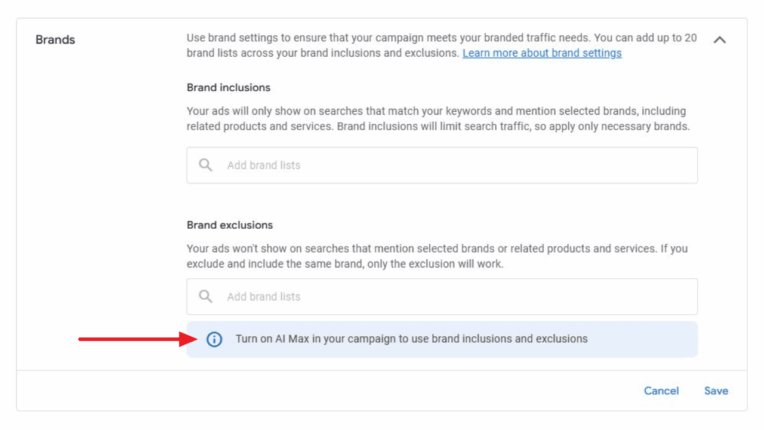
Since 27 May 2025, brand inclusions and exclusions are no longer autonomous. At least, not for new search campaigns. For these campaigns, advertisers have no choice but to activate AI Max. This change has gone largely unnoticed, but it demonstrates Google’s desire to increase automation for controlling and configuring Google Ads campaigns. So how can you use brand controls under AI Max? Find out the answers here.
The activation of AI Max, an essential requirement for brand controls
Brand inclusions and exclusions on Google Ads
As a reminder, brand controls allow you to manage where and how adverts are displayed for all searches related to specific brands.
The objective: to control traffic, optimise the budget and improve targeting.
To do this, you can choose between two types of control:
- Brand inclusions: adverts are only displayed for searches containing specific brand names.
- Brand exclusions: adverts must not appear when queries contain excluded brand names.
Brand checks under AI Max
Until now, brand inclusions and exclusions were autonomous. This is no longer the case since 27 May 2025. Google now integrates them into its AI Max framework.
What does this mean? For all your new search network campaigns, you must enable AI Max if you wish to use brand controls. Existing campaigns can continue to operate as before.
But why such a decision? The integration of brand controls into AI Max signals a desire to further automate campaigns. Today, artificial intelligence features are becoming the norm on the platform.
Advertisers are encouraged to adopt AI Max if they want full access to brand targeting tools on Google Ads. But how do they do this?
Guide to using brand controls in AI Max
The use of brand controls depends on your current situation:
- You have never activated inclusions or exclusions: now is the time to activate AI Max for the campaign. This will allow you to access the brand settings panel.
- You have already integrated inclusions and/or exclusions: a Google Ads banner will invite you to activate AI Max. This is not mandatory. For your existing campaigns, the pre-registered settings can continue to function normally. However, if you wish to add new inclusion and/or exclusion lines, activating AI Max is no longer an option.
Good to know: when you upgrade to AI Max, brand controls are automatically transferred to the intelligent platform dashboard.
For more details, you can also consult the Google guide.
Would you like to learn how to use brand controls in AI Max? Feel free to contact our Google Ads agency to optimise your advertising campaigns.



 Leslie