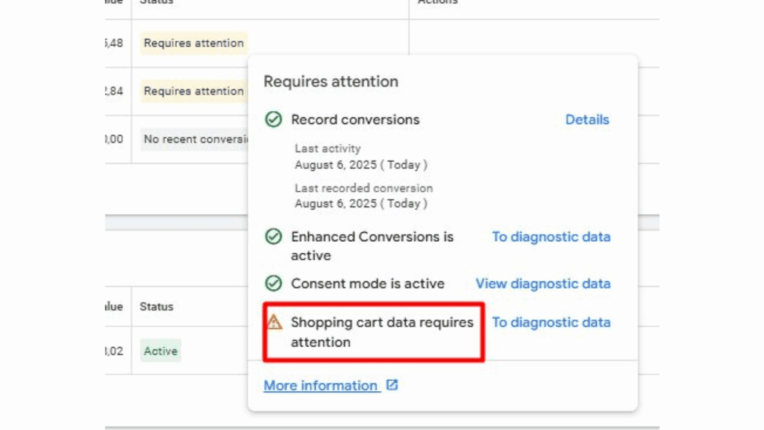
Google Ads has just launched a diagnostic tool dedicated to shopping basket data. Its role is to help advertisers quickly identify errors that affect the accurate tracking of e-commerce conversions. These errors often occur when the information transmitted by the website does not match the information recorded in Merchant Centre.
Thanks to this tool, advertisers now have immediate visibility into issues that have long remained invisible, yet are crucial to campaign performance.
A tool directly accessible in Google Ads
This tool is already available in some accounts. To access it, simply hover over the ‘Status’ column associated with a specific conversion action.
A contextual dashboard will then open. It displays several elements useful for checking tracking:
- Whether or not conversions are recorded
- Enabling enhanced conversions
- The status of the consent mode
- Detecting errors in basket data
Errors are highlighted in red, particularly when product IDs or details do not match those in the Merchant Centre feed.
Why this tool is a game changer
In e-commerce, the quality of tracking data directly influences the profitability of campaigns. When a product ID is missing or inconsistent, Google does not attribute the conversion correctly. This distorts statistics, degrades automatic optimisations, and can lead to a loss of budget.
With this new tool, advertisers can correct errors upstream. This reduces data discrepancies and optimises campaign management, particularly on Shopping and Performance Max.
This tool performs three essential checks:
- It checks that the basket data is sent correctly for each conversion.
- He checks that the product information is complete.
- It compares the transmitted identifiers with those in Merchant Centre.
The results are clear and colour-coded for quick reading. This approach saves time for marketing teams and enables targeted action to correct errors.
Conclusion: more reliable data, more effective campaigns
With this tool, Google emphasises the importance of accurate transactional data. Better informed, advertisers can quickly identify anomalies that are hindering the performance of their e-commerce campaigns.
This new feature therefore offers a simple optimisation tool that can be easily activated and is integrated directly into the Google Ads interface.
Would you like to improve the reliability of your conversion data and boost the effectiveness of your e-commerce campaigns? Our Google Ads agency can assist you with the technical verification of your product feeds and basket tracking.
About Ad's up
Charlotte
Chargée de communication



 Charlotte